----------------------------
昨天買了三本書,
楞伽經今釋
作者: 南懷瑾 居士
西雅圖的行者
作者: 蓮生活佛
真佛法中法
作者: 蓮生活佛
師尊開示提到,楞伽經是一本開悟的經典,
我決定要好好了解楞伽經,
但是我發現,我看不懂文言文,
沒辦法瞜,只好看白話解釋,
我就找到南懷瑾所寫的楞伽經今釋,
祈求三根本加持我,讓我能完完全全融會貫通這本經典。
感恩
阿彌陀佛

cd ~/Downloads/MacVim-snapshot-73/mvim binary to your PATH so that you can open MacVim from any directory in your computer. Like this (you will have to enter your machine password):sudo cp mvim /usr/binmvim hello.c:w to quit).vim for mvim if you want to use MacVim). Vim is highly configurable, but here I will describe what I believe is the most useful setup for new users and C/C++ developers.~/.vimrc. Therefore, type vim ~/.vimrc to start editing your configuration. You might see a blank file if you have never edited Vim’s configuration before. You can copy and paste the following. There’s a comment for the most important commands, so that you can understand what these lines do if you are interested.
1
2
3
4
5
6
7
8
9
10
11
12
13
14
15
16
17
18
19
20
21
22
23
24
25
26
27
28
29
30
31
32
33
34
35
36
37
38
39
40
41
42
43
44
45
46
47
48
49
50
51
52
53
54
55
56
57
58
59
60
61
62
63
64
65
66
67
68
69
70
71
72
73
74
75
76
77
78
79
80
81
82
83
84
85
86
87
88
89
90
91
92
93
94
95
96
97
98
99
100
101
102
103
104
105
106
107
108
109
| " Enables highlight syntaxsyntax enableset nofoldenable" Sweet colorscheme" colorscheme codeschoolset background=dark" Set utf8 as standard encoding and en_US as the standard languageset encoding=utf-8"" Display line numbers on the leftset number"" Use mouse (only for resizing!)set mouse=a" Set the focus to the correct screen (ok, no more mouse thingies)set mousefocus" No more annoying soundsset visualbell" Do not scroll sideways unless we reach the end of the screenset sidescrolloff=0" highlight the status bar when in insert modeif version >= 700 if has("gui_running") au InsertEnter * hi StatusLine guifg=black guibg=green au InsertLeave * hi StatusLine guibg=black guifg=grey else au InsertEnter * hi StatusLine ctermfg=235 ctermbg=2 au InsertLeave * hi StatusLine ctermbg=240 ctermfg=12 endifendif" Infere the case-sensitivityset infercase" Need to set this flag on in order to have many cool features onset nocompatible" Indent properly based on the current filefiletype indent plugin onfiletype plugin on" Pathogen load"filetype off " Makes syntax non-working on office boxcall pathogen#infect()call pathogen#helptags()" Switch between files in buffernnoremap nnoremap " Change default fontsize to fit MacBook Pro 13'set guifont=Monaco:h11" Don't select first Omni-completion optionset completeopt=longest,menuone"set completeopt=menuone,longest,previewset tabstop=4 " a tab is four spacesset backspace=indent,eol,start " allow backspacing over everything in insert modeset autoindent " always set autoindenting onset copyindent " copy the previous indentation on autoindentingset shiftwidth=4 " number of spaces to use for autoindentingset shiftround " use multiple of shiftwidth when indenting with '<' and '>'set incsearch " show search matches as you typeset expandtabset shiftwidth=4set softtabstop=4" Always set the current file directory as the local current directoryautocmd BufEnter * silent! lcd %:p:h" Enable foldingnnoremap "\vnoremap set history=1000 " remember more commands and search historyset undolevels=1000 " use many levels of undo" Tabs in command line mode behave like bashset wildmode=longest,list,fullset wildmenu" Highlight the entire word when searching for itset hlsearch"====[ Make tabs, trailing whitespace, and non-breaking spaces visible ]======exec "set listchars=tab:\uBB\uBB,trail:\uB7,nbsp:~"set list" Move line by line even when the line is wrappedmap j gjmap k gk" Persistent undoset undofile " Save undo's after file closesset undodir=$HOME/.vim/undo " where to save undo historiesset undolevels=1000 " How many undosset undoreload=10000 " number of lines to save for undo" YouCompleteMelet g:ycm_global_ycm_extra_conf = "~/.vim/bundle/YouCompleteMe/.ycm_extra_conf.py"nnoremap |
mkdir -p ~/.vim/autoload ~/.vim/bundle
curl https://raw.githubusercontent.com/tpope/vim-pathogen/master/autoload/pathogen.vim > ~/.vim/autoload/pathogen.vimcd ~/.vim/bundle && \
git clone https://github.com/scrooloose/syntastic.git:Helptags. Linting should be working now for C/C++.cd ~/.vim/bundle && \
git clone https://github.com/fholgado/minibufexpl.vim.gitcd ~/.vim/bundle && \
git clone https://github.com/Valloric/YouCompleteMe.git
cd YouCompleteMe
git submodule update --init --recursive
./install.sh --clang-completer
ruby -e "$(curl -fsSL https://raw.github.com/Homebrew/homebrew/go/install)".vimrc above, we set up the default configuration file in ~/.vim/bundle/YouCompleteMe/.ycm_extra_conf.py. You can simply copy my .ymc_extra_conf.py in this folder. To do so, simply type:curl http://urinieto.com/drop/.ycm_extra_conf.py > ~/.vim/bundle/YouCompleteMe/.ycm_extra_conf.pycvim.zip. Copy the zip file to your ~/.vim/folder and type:unzip cvim.zipvim ~/.vim/c-support/templates/Templates
§ ==========================================================
§ User Macros
§ ==========================================================
SetMacro( 'AUTHOR', 'Oriol Nieto' )
SetMacro( 'AUTHORREF', '' )
SetMacro( 'COMPANY', 'New York University' )
SetMacro( 'COPYRIGHT', '' )
SetMacro( 'EMAIL', 'oriol@nyu.edu' )
SetMacro( 'LICENSE', '' )
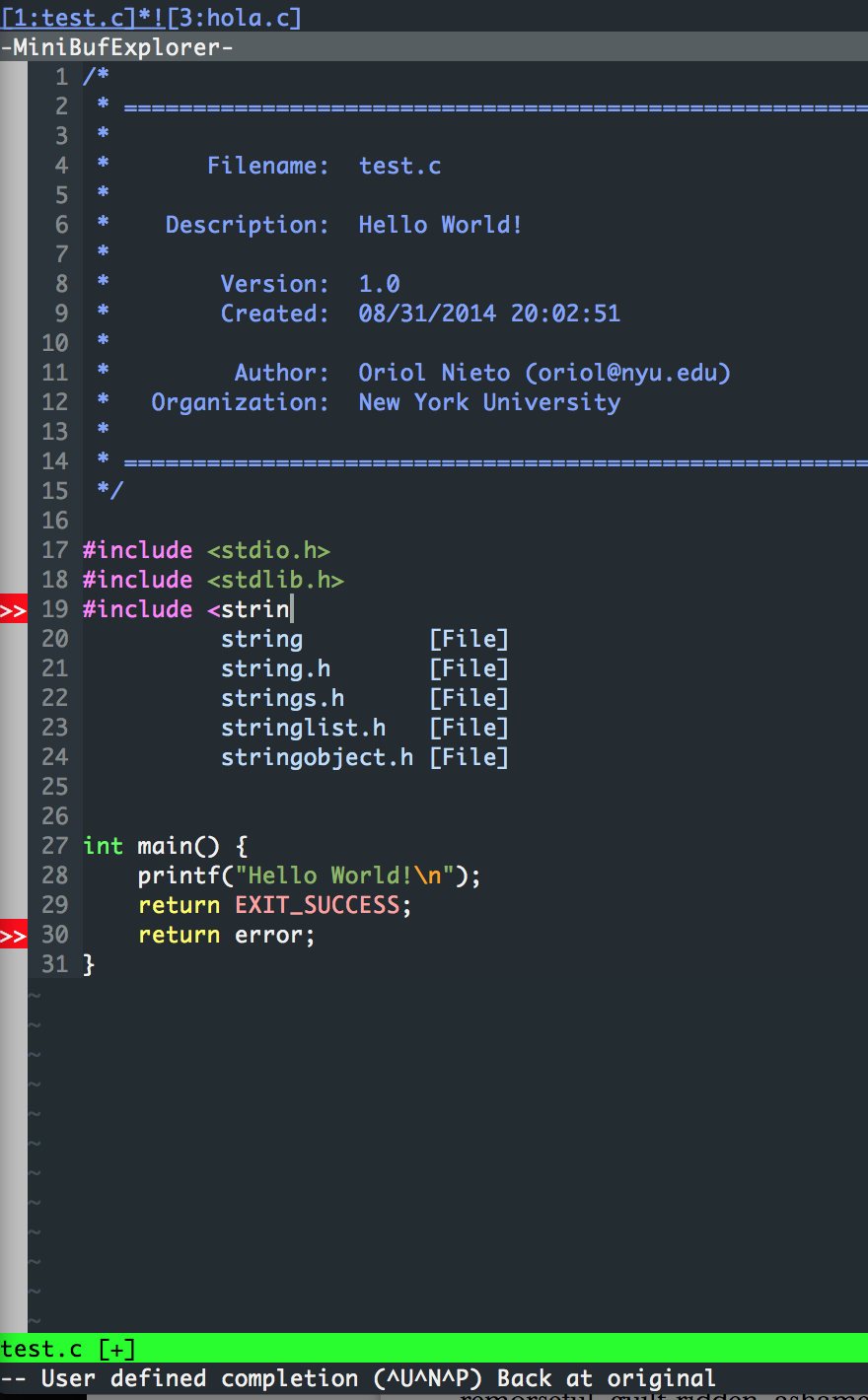
SetMacro( 'ORGANIZATION','New York University' )vim hello.c and a nice template will be included in the top of the file. Moreover, you should be able to open multiple files (e.g. :e otherfile.c) and they will appear in the MiniBufferExplorer. And finally, if you make some errors while coding, Syntastic will tell you. As an example, see the following screenshot: